
Crumb: Keeping Your Pets Safe
Crumb PetHouse & Home
4.61.14K Reviews
- Version
- 2.4.0
- Installs
- 100.00K
- Age Rating
- Everyone
Screenshots
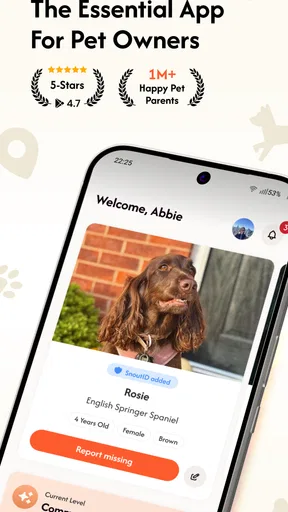
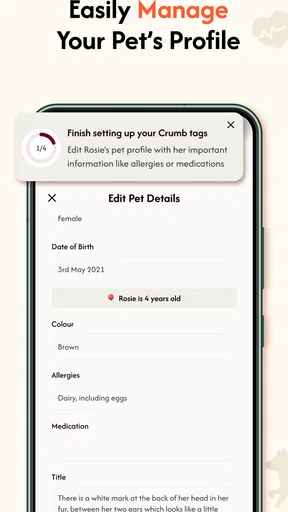
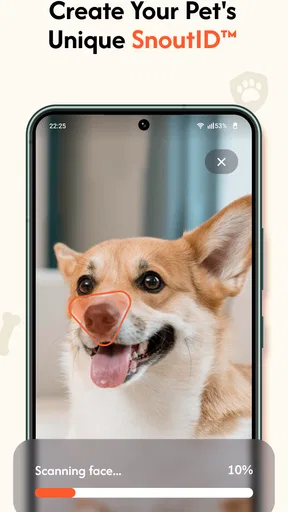
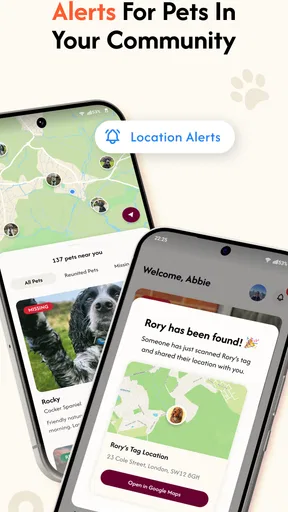
Our Review of Crumb: Keeping Your Pets Safe
 Analysis by Appyee
I approached Crumb as a practical House & Home app rather than another pet-themed download. Its purpose is community help: making it easier for people to act when a pet is lost and to notice information that may help bring that animal home. That sounds simple, but the usefulness depends heavily on timing, attention, and a working connection. In my experience, this is the kind of app whose value appears most clearly during an ordinary walk, a drive through the neighborhood, or the stressful moment when someone realizes a dog or cat has disappeared.
Crumb is free, aimed at Everyone, and developed by Crumb Pet. It has reached over one hundred thousand installs and holds a 4.7 average from around six thousand ratings, with roughly one thousand written reviews. Those figures suggest that the idea is resonating with a meaningful community, but they do not remove the need to use the app thoughtfully. A lost-pet network is only as useful as the people who notice alerts, share accurate information, and respond responsibly.
How Crumb works when connection matters
The most important thing to understand is that Crumb is built around connected participation. When I think about its role, I do not see it as a replacement for calling local shelters, checking nearby streets, or speaking with neighbors. I see it as an additional communication layer that can help information travel beyond the small group already searching.
That changes how I would use it. If I were looking for a missing pet, I would prepare the key details before posting: a clear recent photo, the last known location, the time the pet was seen, identifying markings, and a reliable way for someone to make contact. The more precise the report, the easier it is for another person to decide whether an animal they noticed could be the same one. Vague descriptions create hesitation, especially when someone is looking at a moving animal from a distance.
For someone who has found a pet, the same principle works in reverse. A quick report can be useful, but accuracy matters more than dramatic wording. I would include where the animal was seen rather than guessing where it came from, and I would avoid publishing sensitive personal information. A connected community can spread a helpful message quickly, but it can also spread an incorrect location just as quickly.
This is one of the app’s less obvious trade-offs. Connectivity gives Crumb its reach, yet reach increases the cost of careless details. A report that is updated as circumstances change is much more useful than one that remains visible after the pet has already been found. I would treat every update as part of the search, not as an optional cleanup step.
Useful moments during a normal day
The strongest everyday scenario is not necessarily sitting at home and browsing. Imagine walking a familiar route and noticing a nervous dog near a parking area. You may not know the owner, and you may not feel comfortable approaching the animal. A community app can give you a way to check whether the sighting resembles an existing report, or to pass along a careful observation for someone else to assess.
Another realistic use is checking the app before leaving for a walk with your own pet. If there is a nearby report, you can pay closer attention to side streets, open gates, or places where an animal might hide. This does not turn a walk into a search operation, and I would not recommend putting yourself or your pet in danger. It simply makes local awareness more deliberate.
Crumb is also suited to people who want to help without taking on the responsibility of physically searching. Not everyone can drive around, visit shelters, or spend hours outside. Reading a report, remembering a location, and sharing a credible sighting can still be valuable. That broadens participation beyond the person who originally lost the pet.
At the same time, I would not rely on the app as an emergency channel for an animal in immediate danger. If a pet is in traffic, injured, or being threatened, direct local assistance should come first. The app can support the wider search, but it cannot replace immediate judgment or emergency services.
What changes on mobile
Because the experience is designed for a phone, the practical details of mobile use matter. I would expect to use it while standing outdoors, walking, or moving between locations, which means short, readable information is more useful than a long story. When reporting a sighting, I would write the location and observable facts first, then add context only if it helps someone identify the animal.
Typing quickly on a phone can lead to mistakes, especially when the user is worried. My advice is to pause before submitting and check the street name, direction of travel, color, and distinctive features. A single wrong detail can send volunteers to the wrong place. If the phone is being used while driving, I would wait until safely parked; the urgency of a missing pet is not a reason to create another hazard.
Battery and signal are also practical concerns in a mobile search. I would keep the phone charged before walking through a large area and avoid assuming that every location will provide a dependable connection. A useful habit is to note important information before leaving a strong-signal area, including the last confirmed sighting and the phone number or contact route associated with the search. That preparation reduces dependence on trying to reconstruct details under pressure.
Crumb makes the most sense for people who already keep their phone close and are comfortable checking community information as they move around. It is less suitable for someone who wants a fully passive safety tool that works without attention. The app can help people notice and communicate, but it cannot watch a pet by itself or guarantee that a nearby person will see a report at the right moment.
Handling mistaken sightings and changing situations
Lost-pet searches rarely follow a clean sequence. A report may begin with one location, then shift after a neighbor sees the animal several blocks away. A person may believe they have found the right pet and later realize the markings do not match. This is where recovery habits matter more than the initial post.
If I made a report, I would keep the original information as clear as possible and update it whenever the situation changes. I would also avoid treating an unconfirmed sighting as proof. Describing it as a possible match gives others useful context without creating false certainty. If a pet is safely home, I would make that status clear promptly so people do not continue spending time on an outdated search.
For readers responding to a report, I recommend comparing several details rather than relying on coat color alone. Size, markings, collar, behavior, and exact location can all matter. A similar-looking animal is not necessarily the missing one. This is particularly important when a worried owner may be inclined to accept the first hopeful message.
There is a human side to recovery too. People who find an animal may feel pressure to act quickly, while owners may be frightened or exhausted. I would keep messages factual and respectful, avoid public accusations, and use a safe meeting arrangement if contact is made. The community element works best when it reduces confusion instead of adding conflict.
One limitation is inherent to any community-driven service: activity can vary by area. A busy neighborhood may produce more useful observations than a rural road or a place where few people use the app. That does not make Crumb useless in a quieter location, but it does mean I would combine it with local noticeboards, shelters, veterinary offices, and direct conversations rather than waiting for the app alone to solve the search.
Using it without wasting attention or data
For a data-conscious user, the sensible approach is selective checking. I would not keep refreshing continuously while walking. Instead, I would check at purposeful moments, such as before entering a new area, after receiving a relevant notification, or when I have a specific sighting to compare. This preserves battery and attention while keeping the app connected to a real task.
I would also prepare content efficiently. A well-lit photo that clearly shows the pet is more useful than several nearly identical images. A short description with distinctive details is easier to read on a phone than a long emotional account. If the report needs more explanation, I would add it after the essential facts rather than burying them in the opening lines.
Privacy deserves equal attention. I would share enough location information for a legitimate helper to understand the area, but I would think carefully before posting details about my home, daily routine, or other household members. I would avoid including identifying information that has nothing to do with locating the pet. Community visibility is helpful, but it should not require exposing more of your personal life than necessary.
I would also be cautious with photos that reveal private surroundings. A picture taken near a front door, house number, school, or workplace may unintentionally disclose more than intended. Cropping or choosing a neutral image can preserve the identifying value of the pet while limiting unrelated exposure. This is a small step, but it is exactly the kind of practical judgment that a short store description cannot provide.
Crumb is free, which removes a common barrier for people deciding whether to try a community safety app. Even so, free access does not mean unlimited attention is available. The real cost may be time spent checking reports, responding to messages, or traveling to investigate a sighting. I would use it with a clear purpose and avoid turning every uncertain animal sighting into an urgent search.
Who will benefit most
I think Crumb is a strong fit for pet owners who want a community-based layer alongside their normal safety habits. It is also useful for walkers, delivery workers, cyclists, apartment residents, and anyone who regularly moves through neighborhoods where they might notice an unfamiliar animal. These people are often in the right place to see something important, even if they are not actively searching.
It can be especially helpful for households that want a simple shared routine: one person can monitor reports, another can check nearby streets, and everyone can keep the same description and contact details in mind. The benefit is not only the app itself; it is the way a shared source of information can reduce duplicated effort and inconsistent messages.
I would be more cautious recommending it to someone who expects guaranteed local coverage, instant responses, or a complete replacement for professional and neighborhood outreach. It is not the right choice if you want a dedicated tracking device, a veterinary service, or a private family-only communication tool. Those needs require different solutions. Crumb’s role is community visibility, and that comes with both reach and uncertainty.
Compared with the usual alternatives, such as posting in a neighborhood group or relying on printed notices, Crumb offers a more focused place for pet-related information. A general social network may reach more people, but a focused service can make relevant reports easier to notice. Printed flyers remain useful for people who are not checking their phones, while shelters and veterinary clinics provide local expertise that an app cannot replace. In my view, the best approach is not choosing one method; it is using Crumb as the connected layer in a broader search plan.
What I would do before needing it
I would install the app before an emergency rather than waiting until a pet is missing. That gives me time to understand the interface, decide which photo is clearest, and think through the information I would need to provide. Preparation also reduces the chance of posting an incomplete report while stressed.
I would keep a small set of useful details ready in a private note: the pet’s identifying marks, approximate size, collar description, and a current photo. I would not automatically publish everything, but having it prepared makes a report faster and more accurate. I would also decide in advance who in the household should handle updates, because multiple people changing details independently can create confusion.
When checking a possible match, I would contact the reporting person through the appropriate route rather than confronting a stranger or attempting to capture an unfamiliar animal without a plan. If the animal appears frightened or aggressive, I would keep distance and report the location. Helping safely is more important than producing a dramatic rescue story.
These habits reveal the app’s real strength: it can shorten the distance between observation and useful communication. Its weakness is the same system viewed from another angle. If users post imprecise details, ignore updates, or respond impulsively, the network becomes noisy. Crumb rewards careful participation more than casual scrolling.
My connectivity verdict
Crumb, from Crumb Pet, is a focused free app for House & Home that makes sense when people need to share and notice lost-pet information through their phones. Its 4.7 average and growing user base make it worth considering, while the Everyone rating keeps it accessible to a broad audience. The current release is version 2.2.5, and it supports devices running Android 9 or later.
My recommendation is to use it as a prepared part of a wider pet-safety routine. Check it intentionally, write reports with precise observations, protect private details, and update the community when circumstances change. Do not assume that a connection, a notification, or a nearby report guarantees a result. The app is most valuable when a real person uses it carefully at the right moment.
The central trade-off is simple: Crumb can extend your awareness beyond the people you already know, but its usefulness depends on connected users making reliable decisions. If you want to contribute to that kind of local network, I think it is a worthwhile addition. If you need guaranteed tracking, offline reliability, or professional animal-response support, I would choose another tool alongside it rather than expecting this app to cover every situation.
Privacy and Permissions
See what permissions an app requests and how it handles your data.
- Location
- approximate location (network-based), precise location (GPS and network-based)
- Photos/Media/Files
- read the contents of your USB storage, modify or delete the contents of your USB storage
- Storage
- read the contents of your USB storage, modify or delete the contents of your USB storage
- Camera
- take pictures and videos
- Other
- view network connections, full network access, control vibration, prevent device from sleeping, Google Play license check
Verdict
Strengths of Crumb: Keeping Your Pets Safe
- Quickly organizes important pet information in one accessible place.
- Useful for sharing care details with family members or pet sitters.
- Safety-focused features can help during stressful situations.
- Supports better preparation for emergencies and unexpected events.
- Clean, pet-centered design makes information easy to understand.
Limitations of Crumb: Keeping Your Pets Safe
- Some features may require regular manual updates to stay accurate.
- Its usefulness depends on caregivers having access to the app.
- Not a replacement for professional veterinary advice or emergency services.
- Limited value for owners with only basic pet-care information to store.
- Privacy settings should be reviewed before adding sensitive pet details.
Similar Picks in This Category
View All
Universal TV Remote Control
CodeMatics Media Solutions3.9

AlfredCamera Home Security app
Alfred Systems Inc.4.7

Planner 5D: AI Home Design
Planner 5D4.5

Universal Tv Remote-Cast to TV
One Music Player4.1

Zillow: Homes for Sale & Rent
Zillow Group4.8

99acres Buy/Rent/Sell Property
infoedge.com4.3
Frequently Asked Questions
What is Crumb: Keeping Your Pets Safe?
Crumb: Keeping Your Pets Safe is a pet-care and safety app designed to help owners monitor important information about their animals and respond more confidently in everyday situations. It focuses on practical organization and awareness, giving you a convenient place to manage pet-related details, review safety guidance, and keep essential information available when you need it.
Is Crumb suitable for every type of pet?
The app is primarily intended for people caring for household pets, especially dogs and cats, although some of its organizational and safety features may also be useful for other animals. Before downloading, check the current app-store description for supported species and features, since compatibility can vary by version. It should complement—not replace—professional veterinary advice.
Can Crumb replace a veterinarian or emergency pet service?
No. Crumb can be useful for preparation, reminders, and general safety information, but it is not a substitute for a qualified veterinarian, emergency clinic, or poison-control service. If your pet is injured, has difficulty breathing, may have swallowed something dangerous, or shows severe symptoms, contact a professional immediately rather than relying only on information provided inside the app.
Does Crumb require an internet connection or account?
Some parts of Crumb may work without a constant connection, particularly information you have already loaded or saved on your device. However, features involving synchronization, updates, cloud storage, notifications, or sharing may require internet access and possibly an account. Requirements can differ between Android and iOS, so review the permissions, privacy details, and store listing before creating a profile.
Is Crumb: Keeping Your Pets Safe free to download?
Crumb may be available to download at no initial cost, but availability, subscriptions, advertising, and optional in-app purchases can depend on your platform and region. Check the Google Play or App Store listing for the latest pricing information before installing. It is also worth reviewing renewal terms and cancellation instructions if the app offers a recurring premium plan.
